To activate the Easter eggs in Gabriel Knight 3, you must first learn to use the CONSOLE.
Start the game and press: SHIFT + CONTROLL + TILDE(~).
This will bring up the console at the left top of the screen, here you can type commands in the scriptinglanguage (SHEEP) that was used to create GK3.
To enable the Easter Eggs, you have to type: SetFlag("egg")
Now an Easter Egg icon will appear as a valid verb on various items around the game.
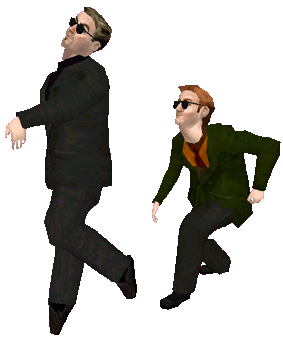 Grace at anytime
Lookit me! I can to the splits!
Lobby at 110am
- Make Jean a happy man.
- Emilio: What strange, mystical power does this man control?
Those silly, wacky henchmen from Scotland.
Outside Hotel at anytime
Chicken, what mystery is this?
Outside Church at 106p
More fun with the beefy guys.
Rennes-les-Bains Bar at anytime
Bartender, can’t--stop--must--disco.
Trainstation at 102p
Find the hidden animal.
CD1 anytime as Gabriel
Sign near round pedestal rock, look Ma, I can fly!
Sidney
- Email: How did those spammers get my email address?
- Search: tycho, penny arcade, dudash, or mcmillen. You’re mileage may vary.
HOW TO EXTRACT FILES FROM THE GAME?
Care to make your own BMP textures, extract sounds and music from the game?
Or want to start modifying the script of the game perhaps, want to build some scenes of your own? Want to know how GK3 was made? You've come to the right place:
-
Type in the console the following command:
Extract , press space and hit ENTER
This will extract a textfile in your main GK3directory, called !!!Readme.txt
This file will explain how to extract some files from GK3's *.BRN files, how to add a custom path, etc... - A few tips:
If you'd like to extract data from the brnfiles, you must start with extracting a filelist. You can do this by typing: ExtractResourceDir("")and pressing ENTER this will put a file called GK3.LOG in your main GK3directory. This file lists all the available data of the BRNfiles (*.BMP/*.WAV/*.MOD/*.EXE/etc..)
To extract these files to your harddrive do so with the Extract("", "") command.
eg: Extract("LHO.MOD", "") - An extremely fun tool is the VIEWER, this program was used during GK3's production and enables you to inspect the charactermodels seperately. You can run their animations, put them in specific scenes etc..
This tool will require some study to use though, but it's alot of fun nevertheless! :)
Best way to get started is to extract a charactermodel (*.MOD) or environmentscene (*.BSP/*.SCN) and open them in VIEWER.EXE.
An error.txt file will be made, describing the bitmaps the program missed for the specific model or scene. Now that you have the names of the bitmaps, just extract them from the *.BRN files as described above. Copy the bitmaps in the *\Viewer Resources Directory and open again :) - There's alot more stuff for you to discover, but I'll leave that up to you! :)
Have fun!!